MCP Infrastructure Setup
This guide is for TrendHub administrators who need to connect an external AI platform, such as Microsoft Copilot, Claude, or another LLM platform, to the TrendMiner MCP server. It describes the network architecture options so you can plan the setup together with your infrastructure team.
Note
The TrendMiner MCP service is part of the TrendMiner Appliance, it is not a separately hosted service. Wherever this guide refers to reaching “the TrendMiner Appliance,” that includes the MCP endpoint.
For where to find the Host URL and OAuth 2.0 client credentials referenced in this guide, see “MCP Connection” guide.
How the connection works
Whichever architecture you choose, an AI client needs two lines of access to the TrendMiner Appliance:
An OAuth 2.0 flow against TrendMiner’s identity provider, so the AI platform authenticates as the process engineer using it.
An HTTP RPC connection to the MCP endpoint, so the AI platform can call TrendMiner’s analytics tools. The MCP service then talks to the TrendMiner API over REST, internally.
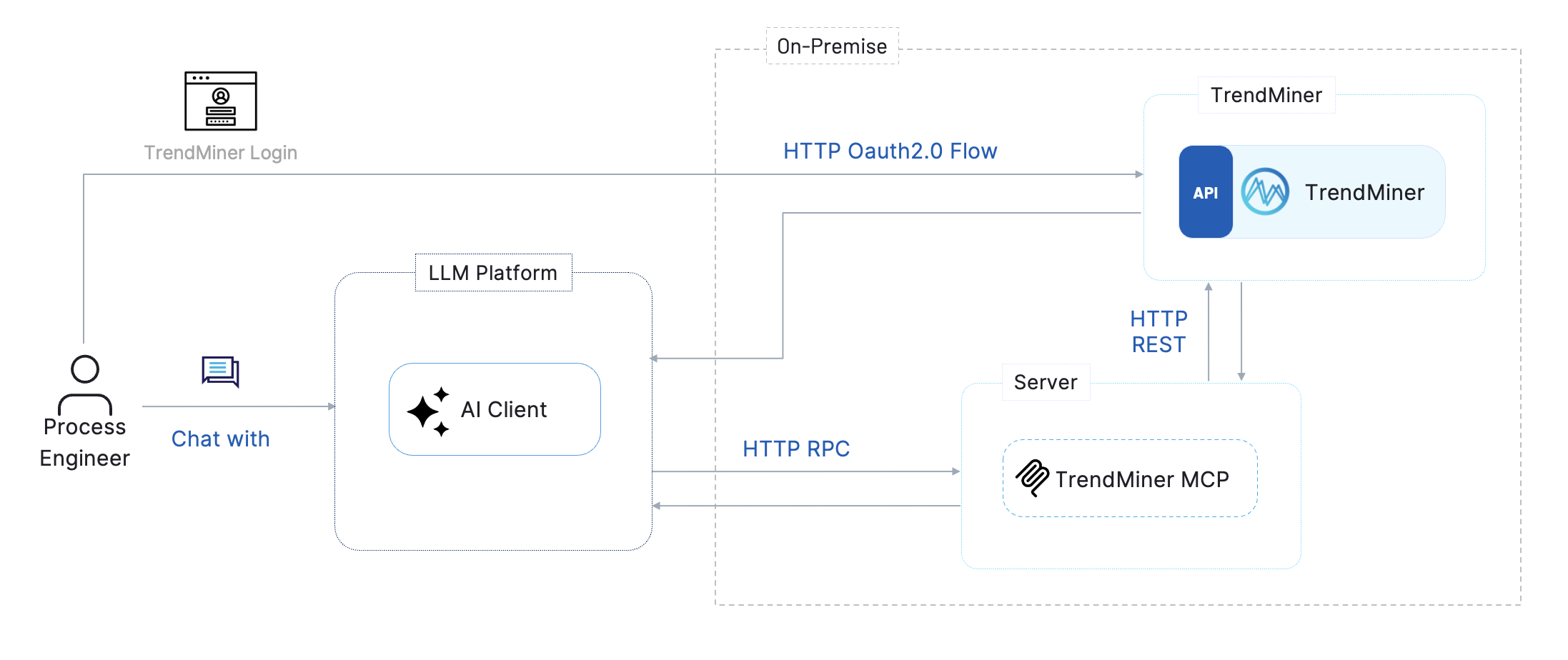
Both connections go to the TrendMiner Appliance. Planning the network setup means making sure both are reachable from wherever the AI platform runs.
Example: endpoints and ports
Both connections run over standard HTTPS, port 443. For a TrendMiner Appliance at https://your-tm.trendminer.net, the endpoints your infra team needs to make reachable are:
Purpose | Endpoint | Port |
|---|---|---|
MCP endpoint |
| 443 (HTTPS) |
OAuth 2.0 authorization |
| 443 (HTTPS) |
OAuth 2.0 token |
| 443 (HTTPS) |
No other ports need to be opened for the AI platform to use the TrendMiner MCP.
Choosing a network architecture
Whether the TrendMiner Appliance needs to be reachable from the public internet depends on where the AI platform itself runs:
Public-cloud AI: the AI platform is a hosted service operated by the LLM provider on its own infrastructure, outside your network, such as Microsoft Copilot, Claude, or ChatGPT. This is the most common case. It needs a path across your network boundary to the TrendMiner Appliance, either by exposing the appliance directly or by placing a proxy in front of it.
On-premises AI: the AI platform already runs inside your private network, for example a self-hosted model or a vendor’s private, VNET-injected deployment. It can reach the TrendMiner Appliance directly, without exposing it to the internet.
Architecture | AI platform location | TrendMiner Appliance exposure |
|---|---|---|
Public-cloud AI - on-premise | Public internet | Directly exposed to the internet |
Public-cloud AI - proxy | Public internet | Not exposed; only the proxy is internet-facing |
On-premises AI - on-premise | Inside your private network | Not exposed to the internet |
Public-cloud AI - On-premise Architecture
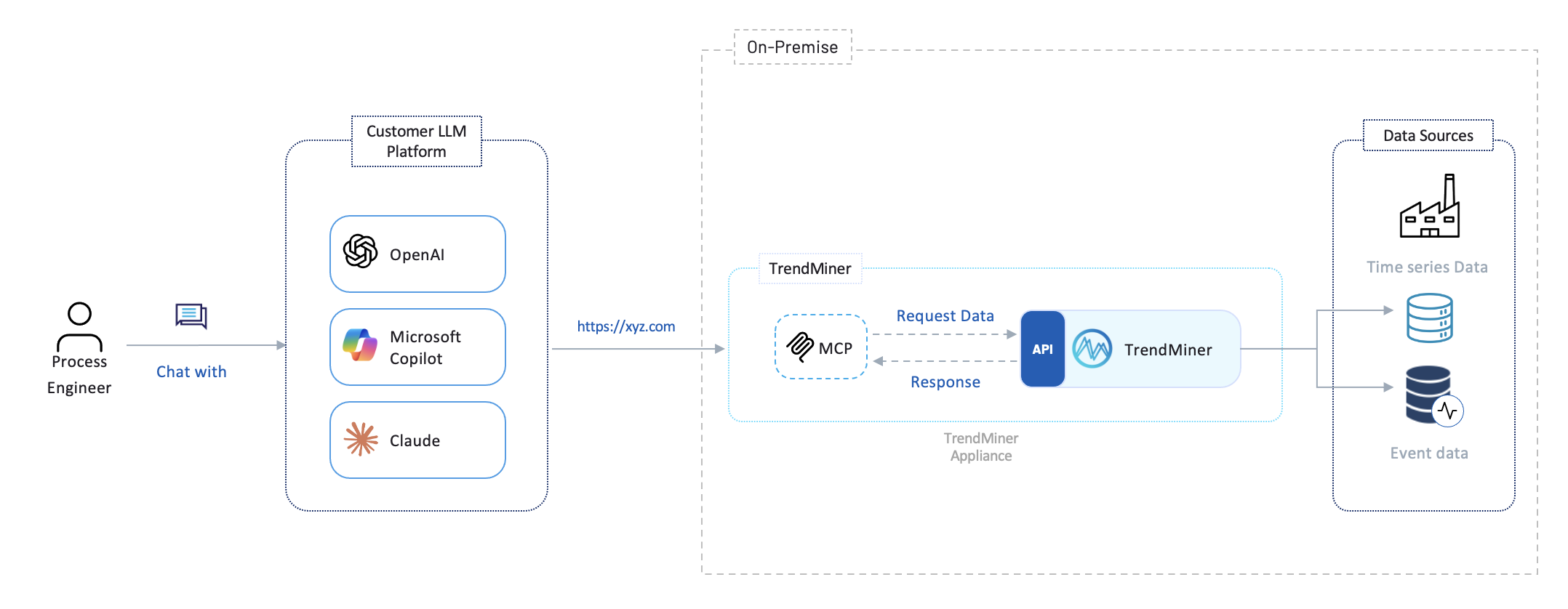
The AI platform reaches the TrendMiner Appliance directly over the internet. This requires exposing the appliance’s Host URL, along with its OAuth 2.0 authorization and token endpoints, to the public internet.
Infrastructure considerations:
Exposed surface: how traffic reaches the appliance, a firewall rule, a port-forward, or placing the appliance itself in a DMZ.
Public DNS and TLS: a public DNS record and a valid public TLS certificate for the appliance’s host name.
Exposed surface: expose the full appliance, or restrict it to just the MCP and authentication paths, optionally combined with an IP allow-list for the AI platform’s known egress ranges.
Public-cloud AI - Proxy Architecture
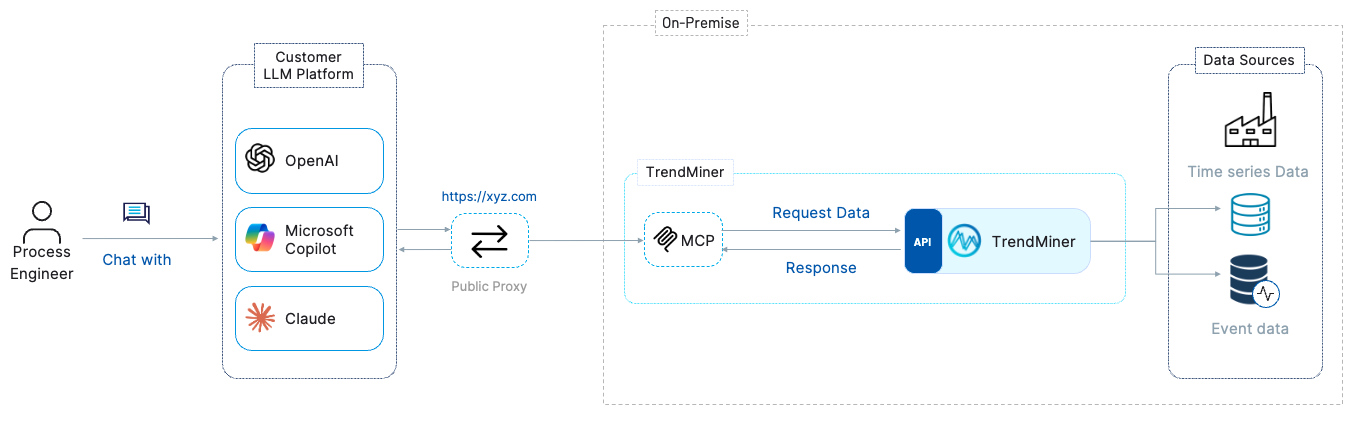
Use this architecture when the TrendMiner Appliance should not be directly reachable from the internet. A proxy, typically placed in a DMZ, is the only component exposed publicly; it forwards traffic to the appliance, which stays on the private network.
The proxy fronts the whole TrendMiner Appliance, not just the MCP endpoint: because the MCP service is part of the appliance, the proxy needs to forward both the MCP endpoint and the OAuth 2.0 authorization and token endpoints.
Infrastructure considerations:
DMZ placement: where the proxy sits, plus firewall rules that restrict direct access to the TrendMiner Appliance to the proxy alone.
Routing: reverse proxy rules covering both the MCP and the authentication paths.
TLS termination: at the proxy, or passed through to the appliance.
Additional protection: an optional WAF or rate-limiting policy in front of the proxy.
On-premises AI - On-premise Architecture
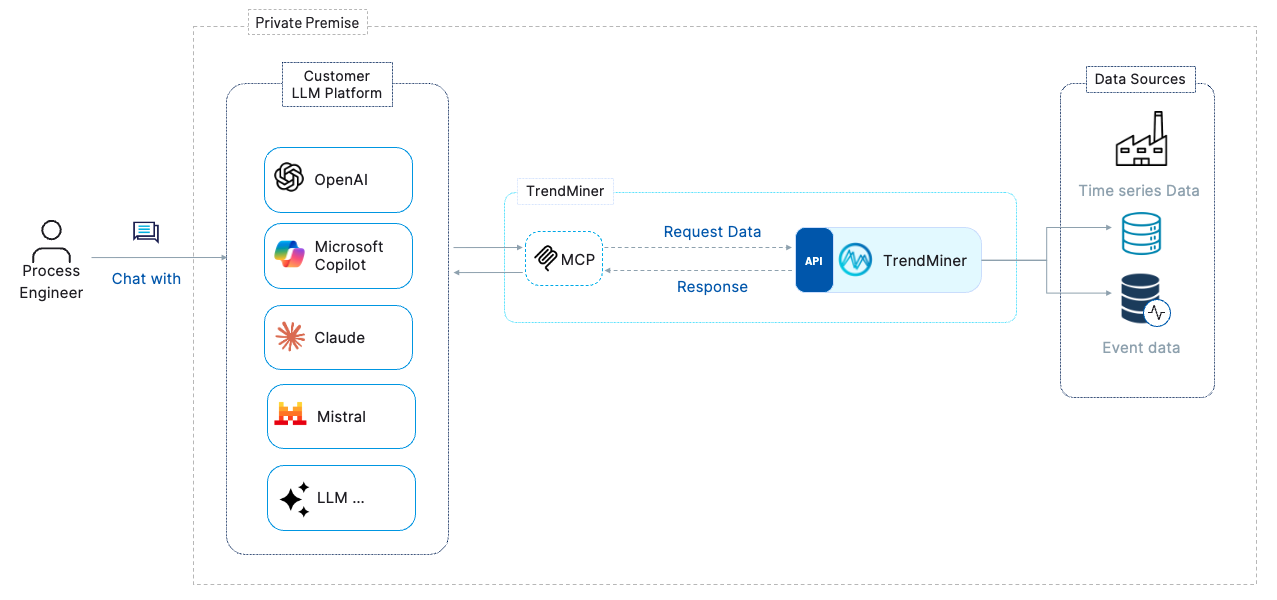
If your AI platform runs inside your own private network, for example a self-hosted LLM or a vendor’s private-endpoint deployment, it can connect directly to the TrendMiner Appliance over the internal network. No internet exposure of the TrendMiner Appliance is needed.
Infrastructure considerations:
Routing: network routing between the AI platform and the TrendMiner Appliance.
Internal DNS: resolution for the appliance’s host name.
TLS trust: whether the appliance’s TLS certificate is already trusted within your internal network, or needs to be added to the AI platform’s trust store.
Security considerations
Source IP ranges
The source IP addresses of AI platform traffic depend on the platform in use. Consult the documentation for your specific AI platform to obtain its outbound IP ranges, then allow only those ranges inbound to whichever component is internet-facing, the TrendMiner Appliance or the proxy.
Microsoft Power Platform / Copilot Studio: outbound IP ranges are published at learn.microsoft.com/en-us/connectors/common/outbound-ip-addresses.
Other platforms: refer to the vendor’s documentation for outbound egress IP ranges.
If static IP filtering is not possible, restrict access at the application layer instead, using mutual TLS or API keys.
Data residency
The TrendMiner MCP service does not store or cache process data externally. All TrendMiner data stays within your on-premises environment; the AI platform only receives the query results returned by the MCP service for the duration of the session.