TrendMiner Lifecycle
Overview important dates
TrendMiner version | End of life date | Extended upgrade support end date |
|---|---|---|
2026.R3.0 | October 12th, 2027 | January 12th, 2028 |
2026.R2.0 | July 31st, 2027 | October 31st, 2027 |
2026.R1.0 | April 2nd, 2027 | July 2nd, 2027 |
2025.R4.0 | December 22nd, 2026 | March 22nd, 2027 |
2025.R3.0 | October 22nd, 2026 | January 22nd, 2027 |
2025.R2.0 | August 22nd, 2026 | November 22nd, 2026 |
2025.R1.0 | May 18th, 2026 | September 18th, 2026 |
Support levels
Each major TrendMiner release goes through the 4 stages listed below. Minor versions are not taken into account for the support levels (a minor version always has the same support level as it's major).
Full support
Last 2 major versions (including potential minor releases).
Bugs/issues with a high impact and security issues are patched. Our Patch Release Updates page contains a list of patches per version.
Fixes for low impact issues and improvements are released in a next release.
Upgrade support
At least 1 year after release date.
Only bugs/issues preventing customers from upgrading are patched.
Upgrades to and from a version with upgrade support are supported within the standard TrendMiner SLA. Troubleshooting and investigation of other issues is no longer covered and customers will always be asked to upgrade to a supported version first.
End of life
After upgrade support for a release has ended installation and upgrade packages will be removed from the download site and documentation will be unpublished. Upgrading to a version which is end of life is no longer possible, unless with extended upgrade support.
No new patches are released.
No new licenses can be generated for TrendMiner versions after their end of life date. Edge Manager will remain available but access to the hubs will be lost when the license expires.
Extended upgrade support
At least 15 months after the release date.
Upgrades to a version after their end of life date might be possible but are not covered by the standard support SLA and will always come at a service fee. TrendMiner does not guarantee that an upgrade can still be performed successfully. As a result failures while upgrading might result in the loss of all TrendMiner data.
Contact your CSM or TrendMiner support for an offer for extended upgrade support.
An upgrade to a version after its extended upgrade support end date is no longer supported. The only way forward is to start with a clean installation of a supported release.
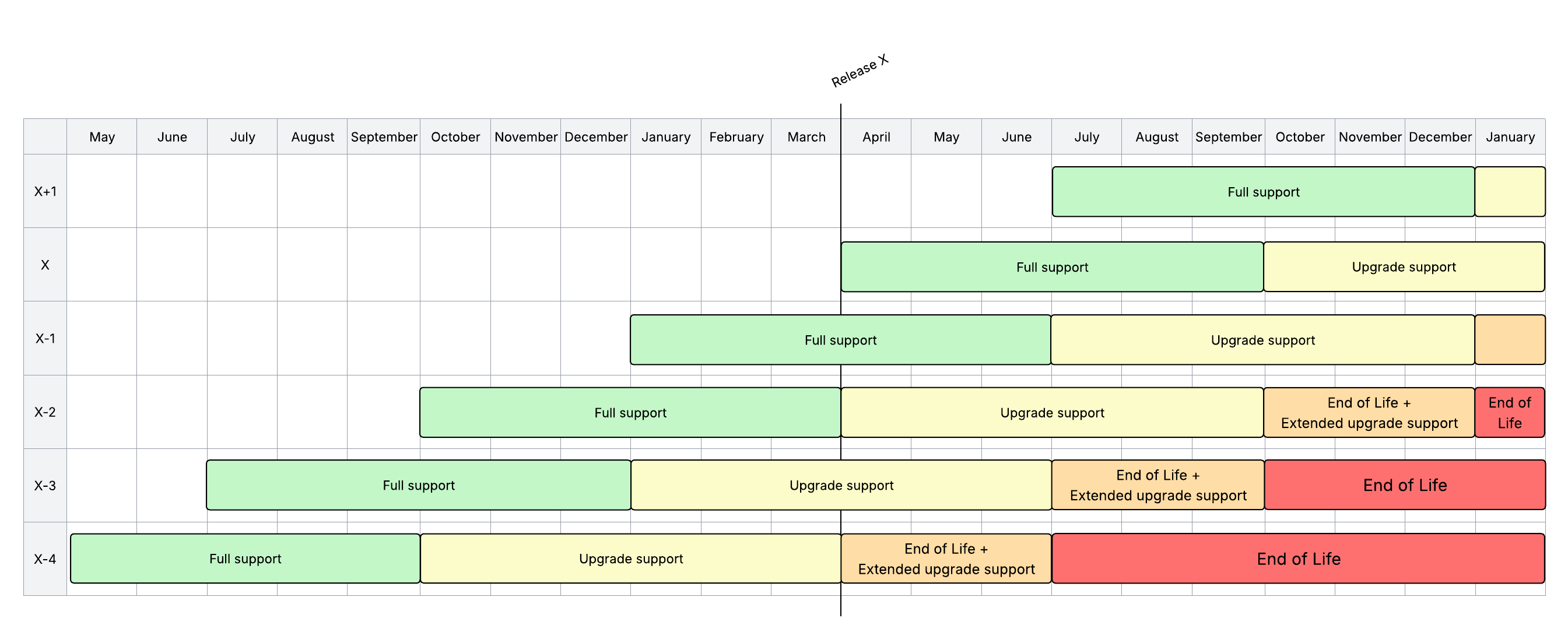
Dates specified in the table take precedence over timings defined in the visual diagram. The visual diagram is purely indicative and should not be considered a definitive reference for scheduling or timing.
Versioning
The TrendMiner version is built up as follows:
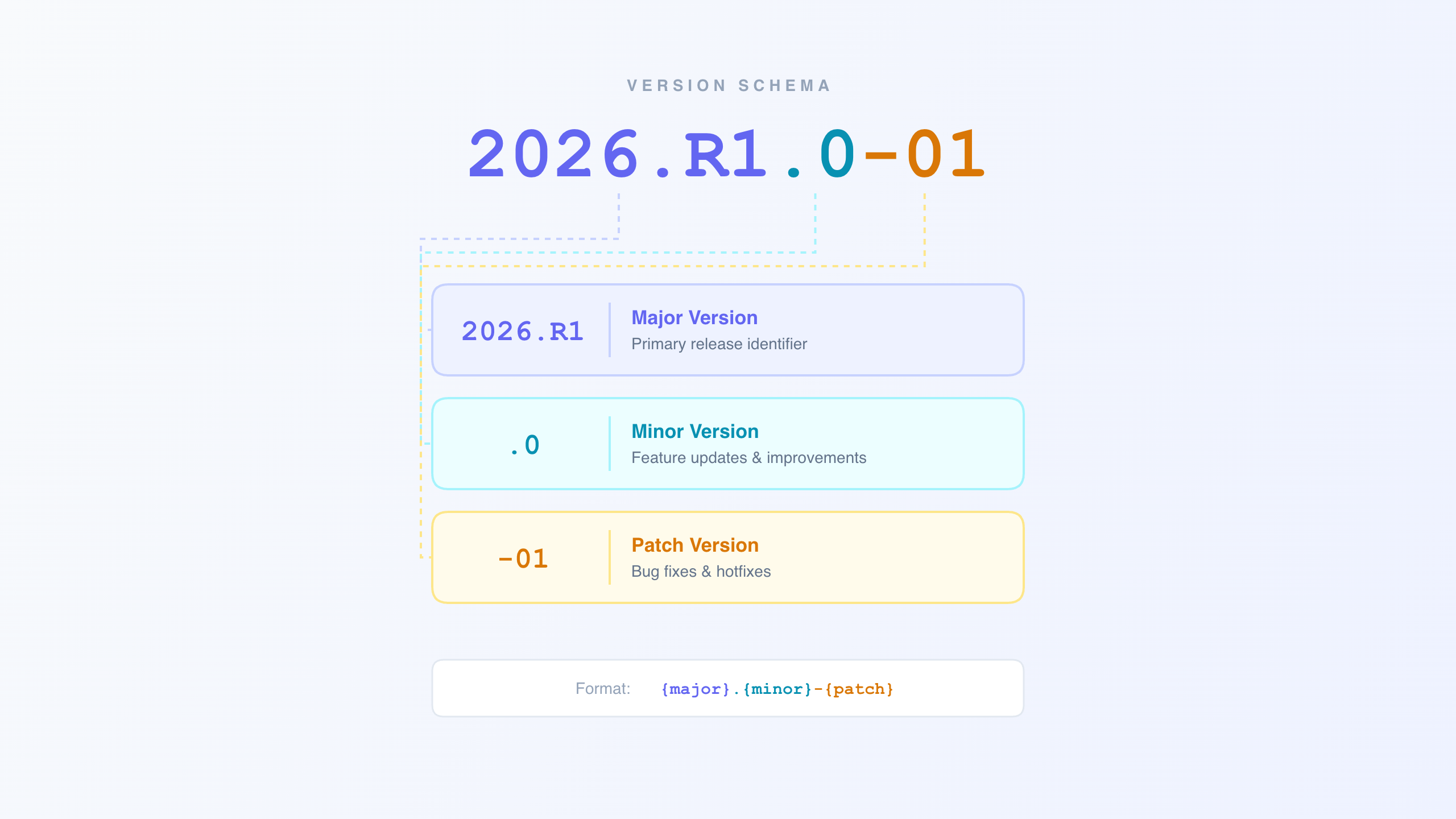 |
Unless mentioned in the upgrade prerequisites minor releases can be skipped during an upgrade. Always check the upgrade prerequisites before performing an upgrade.
If no minor or patch version is mentioned (e.g. 2026.R1) the latest patch of the first major release (e.g. 2026.R1.0-05) is referenced.
Scope of major and minor releases can be found in the release notes. Overview and scope of the patch releases can be found in the patch release updates.
Each major/minor/patch release includes the fixes and improvements of all lower major/minor/patch releases.