Settings
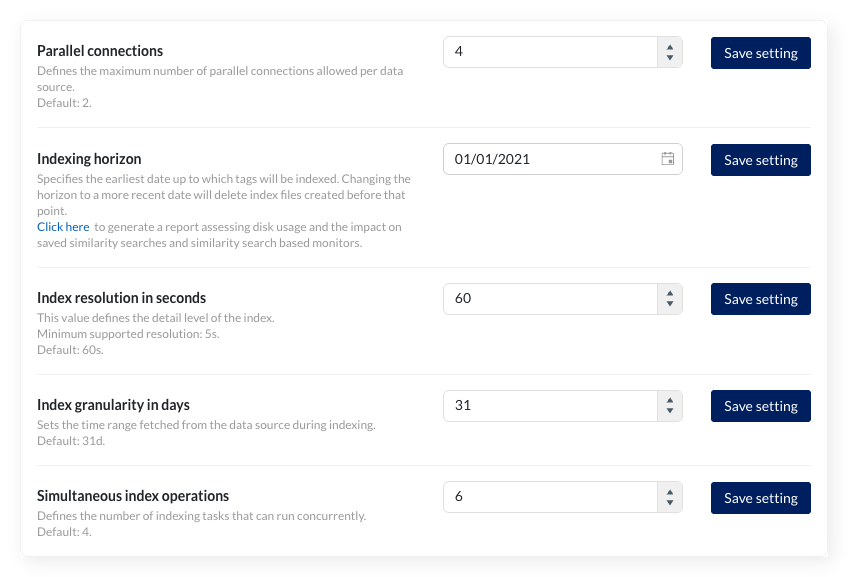
TrendMiner uses certain connection settings to optimize the performance of the historian connection. By default, 2 parallel connections are used. In most cases, the value for the “Historian Parallelism” setting should equal the number of cores on your historian server.
The setting is a global setting, but parallel connections can also be set per datasource (in the Data -> Data sources menu) as an override. Changing the global default will not update the existing overrides. They will keep the current value set as override.
Note
Consult TrendMiner support at support@trendminer.com if you are experiencing performance issues or believe it would be appropriate to change this setting.
The indexing horizon sets the earliest date from which tags are indexed. Tag data before this date is unavailable for TrendMiner analysis.
Default values:
Fresh installations since 2026.R1: January 1st of three years ago (e.g., January 1, 2023 for installations in 2026)
Existing installations: Retain their configured horizon (legacy default was January 1, 2015)
Extending the horizon (setting an earlier date)
When setting the horizon to an earlier date (e.g., from 2020 to 2015), tags automatically complete indexing up to the new horizon once used within the application.
Reducing the horizon (setting a more recent date)
Setting the horizon to a more recent date (e.g., from 2015 to 2020) deletes all index data before the new date to free disk space. Administrators receive a notification when deletion completes.
Validation requirements:
The horizon must be at least 1 month in the past
The date must be the first of a month
Generating index storage and horizon update report
Reducing the indexing horizon mainly saves disk space. However, this affects various features. Refer to this article to see how features depend on the index horizon. Similarity searches with query periods before the new horizon stop working, and their monitors are system-disabled.
You can generate a report up front to simulate the disk space saved and which similarity search items would be affected by clicking the link in the description. This report helps assess impact without changing the horizon.
The export runs in the background. A notification appears when the file is ready to download
Note
You can always reverse this by extending the horizon. All affected items will be corrected once the index data is available again.
The index resolution defines the level of detail of the index. For a resolution of 1 minute (the default) the index contains up to 4 points per minute.
Valid index resolutions are:
Minimum: 5 (five seconds)
Maximum: 86400 (one day)
The index resolution should be able to evenly divide the total seconds in a day and therefore should be a factor of 86400
Caution
If required, an index resolution of 1 second can be configured, though this is not officially supported and might lead to performance issues
Warning
Changing the index resolution will delete all existing tag indexes.
Warning
As you can only search for time periods with a minimal duration of 2 times the index resolution searches can become invalid by lowering the index resolution (e.g. from 30 seconds to 1 minute). As a result search-based monitors can go to a system-disabled state (meaning these monitors will no longer trigger alerts).
The index granularity defines the time periods which are fetched from the datasource to build the index during the indexing process. The smaller the time periods, the more calls have to be made to the datasource, causing greater overheads and slower indexing. The larger the granularity, the greater the risk on connection time-outs and the higher the memory consumption.
The default granularity is 1 month ("1M").
Valid index granularities include, for example, "1D" (1 day) or "5D" (5 days). Changing the granularity will not impact tags which are already indexed.
This value sets the number of simultaneous index operations. As of 2026.R1, the default number of indexing threads for new installations is 4 (previously 2). Existing installations keep their configured value.
Check the following article for more information on how to properly configure this setting: How to determine the best "simultaneous index operations" configuration?
Please contact TrendMiner support before changing this setting.